

Author:
Veed AI Review
VEED is a comprehensive cloud-based video editing platform that transforms complex video creation into an intuitive, accessible process for creators of all skill levels.
Combining powerful AI-driven features with professional-grade editing tools, this online video suite enables users to record, edit, and publish high-quality videos without downloading software or mastering complicated interfaces.
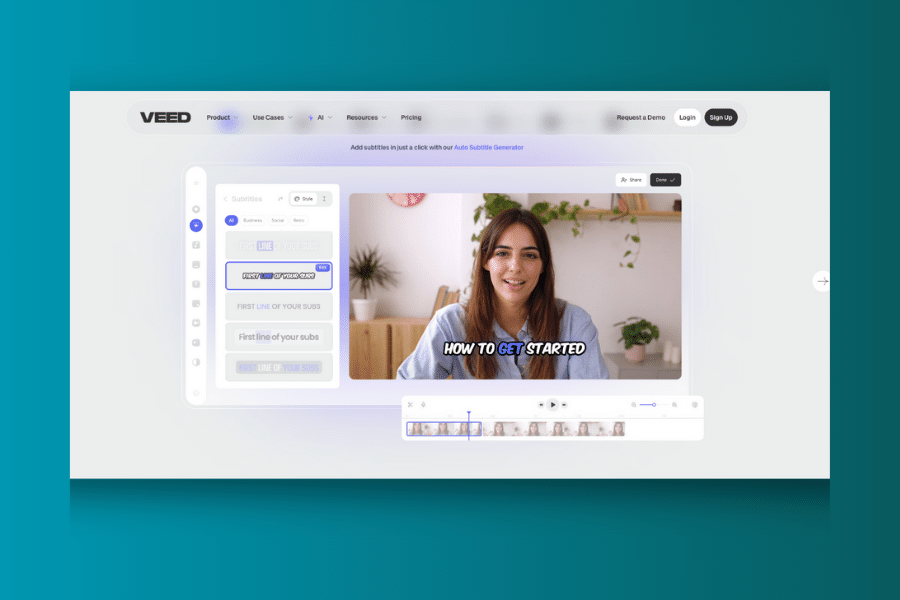
Whether you’re creating content for social media, educational purposes, or professional marketing campaigns, VEED offers a streamlined workflow that significantly reduces editing time while maintaining broadcast-quality results. The platform’s standout AI capabilities, including automatic subtitle generation, voice cloning, and eye contact correction, make it particularly valuable for content creators who need to produce polished videos efficiently.
What is VEED?
VEED is an online video editing platform that operates entirely in your web browser, eliminating the need for software downloads or powerful hardware requirements. Think of it as your complete video production studio accessible from any device with an internet connection.
The platform specializes in making professional video editing accessible to everyone, from complete beginners to experienced content creators. You can trim and merge clips, add text overlays and animations, generate automatic subtitles, and even create AI-powered talking head videos using digital avatars.
What sets VEED apart is its focus on speed and simplicity without sacrificing quality. The drag-and-drop interface allows users to start editing immediately, while advanced AI features automate time-consuming tasks like transcription, background removal, and audio enhancement.
Who Created VEED?
VEED was founded by Sabba Keynejad and Timur Mamedov, two entrepreneurs with a passion for democratizing video creation. Their vision emerged from the frustration of needing expensive software and technical expertise to create professional-quality videos.
The founders recognized that video content was becoming essential for businesses and creators, but the tools available were either too complex for beginners or too expensive for small teams. They set out to build a platform that would empower anyone to tell their story through video, regardless of technical background.
Since its launch, VEED has grown to serve millions of users worldwide, from individual content creators to enterprise teams at major corporations. The company continues to innovate with regular feature updates and AI integrations that keep pace with the evolving needs of digital content creation.
Top Benefits of VEED
Browser-Based Convenience: Work from any device with an internet connection. No downloads, installations, or powerful hardware required – just open your browser and start editing.
AI-Powered Automation: Let artificial intelligence handle tedious tasks like subtitle generation, background removal, and audio enhancement while you focus on creative decisions.
Professional Results Fast: Create broadcast-quality videos in minutes rather than hours. The streamlined workflow eliminates technical barriers that slow down traditional editing.
Collaborative Workflow: Share projects with team members for real-time feedback and editing. Multiple users can work on the same project simultaneously with version control.
Social Media Optimization: Automatically resize and format videos for different platforms like Instagram, TikTok, YouTube, and LinkedIn with preset templates.
Extensive Stock Library: Access millions of royalty-free videos, images, and audio tracks to enhance your content without additional licensing fees.
Multi-Language Support: Generate subtitles and translate content into multiple languages, expanding your audience reach globally.
Best Features
VEED combines essential editing tools with cutting-edge AI features that streamline the entire video creation process. Here are the standout capabilities that make this platform exceptional:
1. AI-Powered Video Editor
The core editing interface uses intelligent automation to speed up common tasks. Magic Cut instantly removes unwanted pauses and filler words from recordings, while the AI background remover eliminates green screens or unwanted backgrounds with a single click.
The editor handles all standard video formats and provides professional-grade color correction, transitions, and effects. Users can layer multiple video tracks, add custom animations, and apply filters to achieve cinematic quality results.
2. Automatic Subtitle Generation
VEED’s AI transcription technology generates accurate subtitles in over 100 languages with impressive speed and precision. The system automatically detects speech patterns and timing, creating properly synchronized captions that enhance accessibility.
Users can customize subtitle appearance with different fonts, colors, and animations. The platform also supports subtitle translation, allowing content creators to reach international audiences without manual transcription work.
3. AI Avatars and Voice Cloning
Create talking head videos using realistic AI avatars that can speak in multiple languages and accents. The voice cloning feature allows users to generate personalized AI voices from short audio samples, perfect for consistent narration across video series.
This feature is particularly valuable for educational content, product demonstrations, and corporate communications where consistent presentation is important but hiring presenters isn’t practical.
4. Screen and Webcam Recording
Built-in recording tools capture screen activity, webcam footage, or both simultaneously. The platform includes a teleprompter feature for scripted presentations and automatic eye contact correction that makes speakers appear to look directly at the camera.
Recordings integrate seamlessly with the editor, allowing users to add graphics, annotations, and effects without switching between applications.
5. Brand Kit and Templates
Maintain consistent branding across all video content with custom templates, color palettes, and logo integration. The brand kit ensures that team members create on-brand content regardless of their design experience.
Pre-designed templates for different industries and use cases provide starting points for common video types like product demos, social media posts, and training materials.
Pricing
| Plan | Price (Monthly) | Key Features | Best For |
|---|---|---|---|
| Free | $0 | 720p export, 10-minute videos, watermark, 2GB storage | Testing and basic projects |
| Lite | $12 | 1080p export, remove watermark, 25-minute videos, unlimited storage | Individual creators |
| Pro | $30 | 4K export, voice cloning, AI avatars, mobile app, priority support | Professional content creators |
| Business | $59 | Team collaboration, brand kit, analytics, custom templates | Small businesses and teams |
| Enterprise | Custom | Advanced security, dedicated support, custom integrations | Large organizations |
All paid plans include annual billing discounts and a free trial period to test features before committing to a subscription.
Pros and Cons
Pros
Exceptional Ease of Use: The intuitive interface allows beginners to create professional videos within minutes of signing up. No learning curve or technical expertise required.
Powerful AI Features: Automatic subtitle generation, voice cloning, and background removal capabilities that would require expensive software or professional services elsewhere.
Cloud-Based Flexibility: Access projects from anywhere, collaborate in real-time, and never worry about software updates or compatibility issues.
Fast Performance: Videos process quickly thanks to cloud-based rendering, even for users with older computers or slow internet connections.
Comprehensive Feature Set: Everything needed for professional video production in one platform, from recording to publishing.
Excellent Customer Support: Responsive help team with extensive documentation and video tutorials for all skill levels.
Cons
Internet Dependency: Requires stable internet connection for all functionality. Offline editing is not possible.
Limited Free Plan: Watermarks and export restrictions make the free version suitable only for testing purposes.
Subscription Cost: Monthly fees can add up for casual users who only edit videos occasionally.
Advanced Features Locked: Professional capabilities like 4K export and AI avatars require higher-tier subscriptions.
Limited Analytics: Doesn’t offer a robust analytics offering (like DataFa.st does).
Storage Limitations: Large video files can quickly consume cloud storage allowances on lower-tier plans.
Alternatives to VEED
Adobe Premiere Pro: Professional desktop video editing software with advanced features but requires significant learning time and powerful hardware.
Canva: User-friendly design platform with basic video editing capabilities, ideal for social media content but limited in advanced features.
Loom: Specializes in quick screen recording and sharing, perfect for tutorials and team communication but lacks comprehensive editing tools.
InVideo: AI-powered video creation platform with templates and automation, similar to VEED but with different pricing structure and feature focus.
Filmora: Desktop video editor that balances ease of use with professional features, requires software installation but offers offline editing.
Clipchamp: Microsoft’s online video editor integrated with Office 365, good for basic editing but limited AI capabilities compared to VEED.
Personal Experience with VEED
Our team extensively tested VEED across various video creation scenarios, from social media content to professional training materials. The platform consistently delivered impressive results with minimal effort required.
What Worked Exceptionally Well:
The automatic subtitle generation proved remarkably accurate, saving hours of manual transcription work. We were particularly impressed by the AI’s ability to handle different accents and technical terminology correctly.
The eye contact correction feature transformed our talking head videos, making presenters appear more engaging even when reading from scripts. This single feature eliminated the need for multiple takes and significantly improved our content quality.
Team collaboration tools streamlined our review process. Multiple team members could leave timestamped feedback, and version control prevented conflicts when multiple editors worked on the same project.
Challenges Encountered:
Large file uploads occasionally timed out on slower internet connections, requiring multiple attempts for 4K footage. The platform performed best with stable, high-speed internet access.
While the AI voice cloning feature was impressive, it required several attempts to achieve natural-sounding results for longer narrations. Short clips worked perfectly, but extended voice cloning sometimes produced robotic inflections.
Overall Impact:
VEED reduced our video production time by approximately 60% while maintaining professional quality standards. The platform enabled team members with no prior editing experience to contribute meaningfully to video projects, democratizing content creation across our organization.
Final Thoughts
VEED successfully addresses the primary pain points of modern video creation: complexity, cost, and time investment. The platform delivers professional results without requiring technical expertise or expensive software, making it accessible to creators at all levels.
For content creators, marketers, and businesses that need to produce regular video content, VEED offers exceptional value through its AI-powered automation and streamlined workflow. The time savings alone often justify the subscription cost for teams creating multiple videos per month.
While the platform has limitations – particularly internet dependency and subscription costs for advanced features – the benefits far outweigh these constraints for most users. The continuous addition of AI features and regular updates suggest VEED will remain competitive as video creation technology evolves.
The free plan provides an excellent opportunity to test the platform’s capabilities, and the pricing structure scales appropriately from individual creators to enterprise teams. For anyone seeking to create professional video content efficiently, VEED deserves serious consideration as a primary editing solution.
If you’re ready to streamline your video creation process and leverage AI to enhance your content, start with VEED’s free trial to experience the platform’s capabilities firsthand.
Frequently Asked Questions
Is VEED suitable for complete beginners?
Absolutely. VEED’s drag-and-drop interface and automated features make it accessible to users with no video editing experience. The platform includes tutorials and templates to help beginners create professional results immediately.
Can I use VEED offline?
No, VEED is entirely cloud-based and requires an internet connection for all functionality. This design enables access from any device but means offline editing isn’t possible.
How accurate are the automatic subtitles?
VEED’s AI subtitle generation is highly accurate for clear audio in over 100 languages. Accuracy rates typically exceed 95% for high-quality recordings, though technical terms or heavy accents may require minor corrections.
What file formats does VEED support?
VEED accepts all major video formats including MP4, MOV, AVI, and WMV. The platform also supports various audio and image formats for multimedia projects.
Is there a limit on video length?
Video length limits depend on your subscription plan. The free plan allows 10-minute videos, while paid plans support longer content up to several hours depending on the tier selected.
