

Author:
Slidesgo AI Review
Slidesgo AI is a revolutionary presentation design platform that transforms the way professionals, students, and educators create compelling presentations through intelligent automation and an extensive template library.
Whether you need to design business presentations, educational materials, or creative slideshows, this tool delivers professional-quality results in minutes while offering both free and premium AI-powered features.
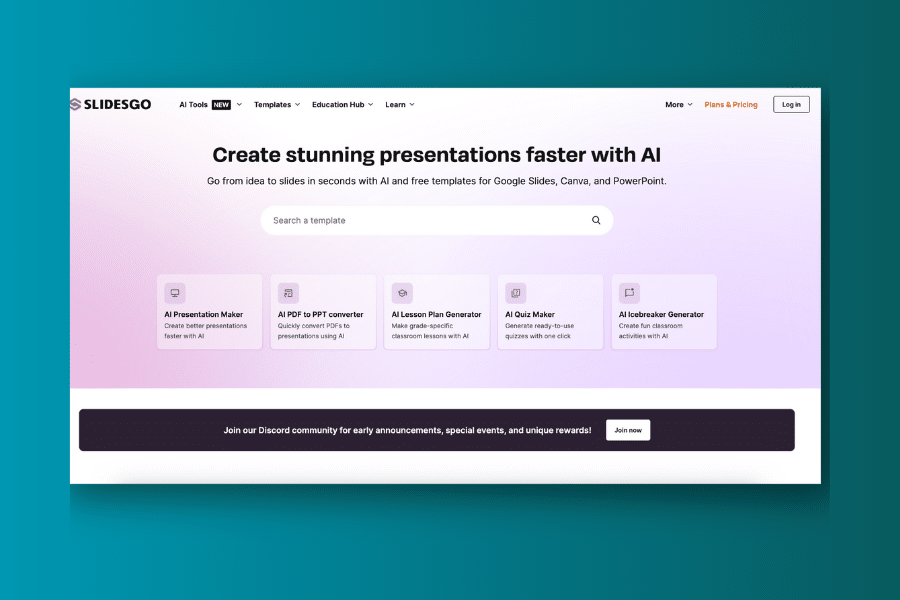
While the free plan has limitations and some premium features require a subscription, Slidesgo AI offers exceptional value for anyone who regularly creates presentations and wants to save time without compromising on design quality.
Ever found yourself spending hours trying to create a visually appealing presentation, struggling with design elements, or searching for the right template? Traditional presentation creation can be overwhelming, requiring extensive design skills, time-consuming formatting, and multiple revisions just to produce basic slides. What if there was a smarter, more efficient way to create professional presentations?
Slidesgo AI promises to be your presentation creation salvation if you’re tired of the time-consuming design process. This powerful AI platform claims to generate high-quality presentation templates and slides in seconds while maintaining professional standards and visual appeal. Let’s dive deep into what this AI presentation companion can do for your content creation workflow.
What is Slidesgo AI?
Slidesgo AI is like having a professional presentation designer who never runs out of creative ideas or gets tired of formatting slides. It uses advanced artificial intelligence to understand your presentation needs and help you create stunning visual content across various formats and styles. Think of it as a personal design assistant that specializes in transforming your ideas into polished, professional presentations.
The platform specializes in AI-driven presentation generation, offering tools that would typically require hours of manual design work. From business presentations to educational materials, Slidesgo AI leverages cutting-edge design algorithms to deliver results that maintain consistency with professional standards and visual appeal.
What sets Slidesgo AI apart is its focus on accessibility and versatility. You don’t need to be a professional designer or have extensive experience with presentation software. The platform is designed to work seamlessly with PowerPoint and Google Slides while helping you produce everything from academic presentations to marketing pitches with remarkable efficiency.
Who Created Slidesgo AI?
Slidesgo AI was created by Freepik Company, the same team behind popular design platforms like Canva and the extensive Freepik image library. This innovative group recognized the universal struggle with presentation design and the time-consuming nature of creating visually appealing slides, leading them to develop a solution that would make professional presentation design accessible to everyone.
Their vision was to create more than just another template library – they wanted to build a user-friendly platform that feels like having a genuine design partner rather than a static template collection. The team’s goal was to develop an AI that could understand individual presentation needs and provide personalized design suggestions, making the entire presentation creation process smoother and more enjoyable.
The platform continues to evolve through regular updates and feature enhancements, reflecting the team’s commitment to staying at the forefront of AI presentation technology and user experience innovation.
Top Benefits of Slidesgo AI
Save Time: Generate complete presentations in minutes rather than hours using ready-made templates and AI-powered design suggestions, freeing up valuable time for content development and rehearsal.
Professional Design Quality: Access thousands of professionally designed templates that maintain visual consistency and modern design standards without requiring design expertise.
Enhanced Productivity: Automate the most time-consuming aspects of presentation design, allowing you to produce significantly more presentations across multiple topics and formats.
Seamless Integration: Work directly with PowerPoint and Google Slides, ensuring compatibility with your existing workflow and collaboration tools.
Freepik Integration: Access high-quality images, icons, and graphics from the extensive Freepik library, eliminating the need for separate image sourcing.
Complete Customization: Tailor presentation designs, colors, fonts, and layouts to match your specific brand requirements or personal preferences.
Versatile Content Creation: Create everything from business presentations and educational materials to creative slideshows and infographics using a single, integrated platform.
Best Features
Slidesgo AI isn’t just another template collection. It’s a comprehensive presentation creation suite designed to handle every aspect of the design process with intelligence and efficiency. Here are the standout features that make Slidesgo AI exceptional:
1. AI Presentation Maker
The AI Presentation Maker is perfect for users who need to create comprehensive presentations quickly. Simply provide a topic and key points, and Slidesgo AI generates well-structured, visually appealing presentations that adapt to different styles and professional formats.
This feature excels at maintaining visual consistency, proper information hierarchy, and professional appearance while ensuring originality and meeting specific requirements for length and complexity.
2. AI PDF to PPT Converter
Document conversion is often a tedious task. Slidesgo AI’s PDF to PPT converter automatically transforms PDF documents into editable PowerPoint presentations, saving hours of manual recreation time.
This feature ensures your existing documents are easily adaptable to presentation formats, automatically formatting content according to professional presentation standards while maintaining readability and visual appeal.
3. Free SlideShow Maker
Accessibility is crucial for widespread adoption. The Free SlideShow Maker allows users to create professional presentations without any cost, providing access to basic templates and design tools.
Particularly valuable for students and small businesses, this feature ensures everyone can create quality presentations regardless of budget constraints, making professional design accessible to all users.
4. Educational Materials for Teachers
The Educational Materials feature provides incredible value for educators, allowing them to create engaging lesson plans, interactive presentations, and classroom materials through specialized templates.
This feature makes Slidesgo AI adaptable to educational needs, from elementary school lessons to university lectures, providing tools specifically designed for learning environments.
5. Infographic Templates
Beyond traditional presentations, Slidesgo AI includes comprehensive infographic creation tools that help visualize complex data and concepts effectively.
The infographic templates help ensure your presentations communicate information clearly and engagingly while maintaining professional visual standards and data visualization best practices.
Pricing
| Plan | Price | Key Features | Best For |
|---|---|---|---|
| Free | $0 | Basic templates, Limited downloads, Attribution required | Students, Light users, Testing |
| Premium | $5.99/month | Unlimited downloads, AI tools, Premium templates, No attribution, Priority support | Professional users, Heavy users, Businesses |
The free plan offers a good opportunity to test Slidesgo AI’s capabilities, while the Premium plan provides unlimited access to all features for serious presentation creators and professionals.
Pros and Cons
Pros
- Intuitive Interface: User-friendly design that’s accessible to users of all skill levels
- Extensive Template Library: Thousands of professionally designed templates across multiple categories
- AI-Powered Features: Intelligent design suggestions and automated presentation generation
- Cross-Platform Compatibility: Works seamlessly with PowerPoint and Google Slides
- Time-Saving Automation: Dramatically reduces presentation creation time
- Professional Quality: Maintains high design standards and visual consistency
- Freepik Integration: Access to extensive image and graphic libraries
- Free Version Available: Test the platform before committing to paid plans
Cons
- Subscription Cost: Monthly fees can accumulate for casual users
- Limited Free Features: Free plan has restrictions on downloads and premium templates
- Internet Dependency: Requires stable internet connection for all functions
- Template Similarity: Popular templates may be used by multiple users
- Customization Limits: Some advanced design modifications may be restricted
- Learning Curve: Advanced AI features may require time to master effectively
Alternatives to Slidesgo AI
Canva: A versatile graphic design platform that offers presentation templates alongside numerous other design tools. Excellent for users who need comprehensive design capabilities beyond presentations.
Beautiful AI: Focuses on AI-driven smart templates that automatically adjust layouts and maintain design consistency. Higher price point but offers more advanced AI automation features.
Gamma AI: An AI-first platform that generates presentations from text prompts quickly. Offers modern templates and streamlined AI-powered creation workflows.
Prezi: Employs a dynamic, non-linear zooming interface for more engaging presentations. Unique approach that differs from traditional slide-based formats.
Pitch: A collaborative presentation platform designed for teams, emphasizing streamlined workflows and real-time collaboration features.
Tome: Focuses on narrative-driven presentations with interactive elements and multimedia integration capabilities.
Personal Experience with Slidesgo AI
Our team recently integrated Slidesgo AI into our presentation workflow, and it transformed our approach to slide creation. We were struggling to maintain design consistency across multiple team members and spending too much time on formatting rather than content development.
How Slidesgo AI Helped:
Business Presentations: We used the AI Presentation Maker and professional templates to create compelling business presentations for client meetings. The generated designs were visually appealing and maintained brand consistency, saving us significant time while improving our professional image.
Educational Materials: Our training team utilized Slidesgo AI to create engaging educational content for employee onboarding and skill development. The educational templates helped us structure information effectively and maintain audience engagement.
Marketing Presentations: We leveraged the infographic templates and visual design tools to create persuasive marketing presentations that improved our conversion rates and client engagement.
The key benefits that helped us achieve our goals included remarkable efficiency in presentation creation, consistently high-quality visual output, incredible versatility across presentation types, and the ability to customize designs to match our brand guidelines and target audience preferences.
Final Thoughts
Slidesgo AI represents a significant advancement in AI-powered presentation design. It’s an excellent tool for anyone who regularly creates presentations, from students and professionals to marketers and educators. The combination of intelligent automation, extensive template library, and comprehensive features makes it a valuable addition to any presentation workflow.
For content creators, students, and professionals who need to produce large volumes of quality presentations efficiently, Slidesgo AI offers tremendous value. The platform’s ability to integrate with existing tools while providing professional design suggestions makes it a compelling choice for serious presentation creators.
While the free plan has limitations and some advanced features require a subscription, the time savings and quality improvements make Slidesgo AI worthwhile for anyone who creates presentations regularly. The platform’s continuous evolution and feature additions suggest it will only become more powerful and useful over time.
If you’re looking to streamline your presentation creation process, overcome design challenges, and produce higher quality slides more efficiently, Slidesgo AI is definitely worth exploring. The free plan offers a risk-free way to experience the platform’s capabilities and determine if it fits your specific presentation needs.
Frequently Asked Questions
Is Slidesgo AI suitable for students?
Yes, Slidesgo AI can be extremely helpful for students. It assists with creating academic presentations, project slideshows, and educational materials. The free plan provides access to basic templates, making it budget-friendly for students. However, it’s important to follow academic integrity guidelines and use the tool to enhance your presentations, not replace your original work.
What types of presentations can Slidesgo AI create?
Slidesgo AI is highly versatile and can generate various presentation types, including business presentations, educational materials, marketing pitches, creative slideshows, infographics, and academic presentations. You can customize the design, colors, and layout to match your specific needs across different formats and industries.
How much does Slidesgo AI cost?
Slidesgo AI offers a free plan with basic features and limited downloads, and a Premium plan for $5.99 per month with unlimited downloads, AI tools, and premium templates. They occasionally offer discounts and special deals, so it’s worth checking their website for the latest pricing information.
What are the main limitations of Slidesgo AI?
While Slidesgo AI is powerful, it has some limitations. The free plan has restrictions on downloads and premium templates. Popular templates may be used by multiple users, potentially reducing uniqueness. Some advanced customization options may be limited, and the platform requires an internet connection for all functions.
Is Slidesgo AI easy to use for beginners?
Yes, Slidesgo AI is designed with an intuitive and user-friendly interface. Even if you’re new to presentation design tools, you’ll find it easy to navigate and create professional presentations quickly. The platform works seamlessly with familiar tools like PowerPoint and Google Slides, making it accessible to users of all skill levels.
