

Author:
RoomGPT AI Review
RoomGPT is an AI-powered interior design tool that transforms any room with just one photo upload, offering instant visualizations of different design themes and styles without requiring expensive interior designers or professional consultation.
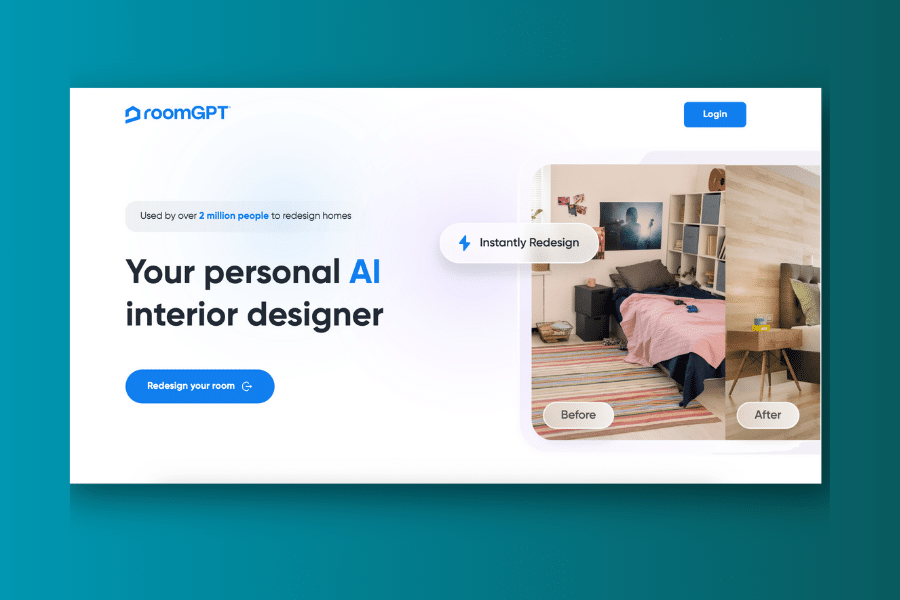
This innovative platform has gained popularity among over 2 million users worldwide who want to visualize room makeovers before committing to renovations. Whether you’re a homeowner looking to refresh your space, a renter wanting to experiment with design ideas, or a real estate agent showcasing potential room transformations, RoomGPT provides an accessible solution for interior design visualization.
While the tool excels at generating quick design variations and eliminating the guesswork from room redesigns, it does have limitations in customization options and relies heavily on photo quality for optimal results. The pricing structure uses a credit-based system that may require additional purchases for extensive use.
What is RoomGPT?
RoomGPT is like having a personal interior designer available 24/7 at a fraction of the cost. It uses advanced artificial intelligence to analyze your uploaded room photo and generate redesigned versions based on your selected style preferences and room type.
The platform leverages machine learning models, specifically ControlNet technology, to understand spatial relationships and furniture placement in your existing room. It then applies different design themes while maintaining the room’s basic structure and layout.
What sets RoomGPT apart from traditional interior design services is its speed and accessibility. You don’t need any design experience or technical knowledge to use the tool effectively. Simply upload a photo, select your preferences, and receive professional-quality design visualizations within seconds.
Who Created RoomGPT?
RoomGPT was developed by Hassan El Mghari (Nutlope), who created this open-source project to democratize interior design and make it accessible to everyone. The tool has gained significant traction in the AI community, with over 8,500 stars on GitHub and widespread adoption across various user demographics.
The platform reflects a commitment to combining cutting-edge AI technology with practical applications that solve real-world problems. The development team continues to enhance the tool’s capabilities while maintaining its user-friendly approach and affordable pricing structure.
Top Benefits of RoomGPT
Cost-Effective Design Solutions: RoomGPT eliminates the need for expensive interior design consultations, offering professional-quality visualizations at a fraction of traditional costs.
Instant Visualization: See how your room would look in different themes and styles within seconds, helping you make confident design decisions before investing in furniture or renovations.
Multiple Style Options: Choose from over 10 different design themes including modern, neoclassic, industrial, tropical, and professional styles to match your aesthetic preferences.
Time-Saving Solution: Overcome design indecisiveness quickly by comparing multiple style variations side-by-side, streamlining your decision-making process.
User-Friendly Interface: No design experience required – the intuitive platform guides you through the entire process with simple upload and selection steps.
High-Quality Results: Generate realistic, detailed room transformations that accurately reflect how your space could look with different design approaches.
Versatile Room Support: Works effectively with various room types including living rooms, bedrooms, dining rooms, offices, and bathrooms.
Best Features
RoomGPT offers several standout features that make it a compelling choice for interior design visualization. Here are the key capabilities that set this AI tool apart:
1. One-Photo Transformation
The core feature that defines RoomGPT is its ability to completely transform any room using just a single uploaded photograph. This technology analyzes your space’s dimensions, lighting, and existing elements to create realistic design variations.
The AI maintains structural integrity while reimagining furniture placement, color schemes, and decorative elements. This feature is particularly valuable for homeowners who want to explore design possibilities without physically moving furniture or making purchases.
2. Multiple Design Theme Selection
Choose from an extensive library of design themes including modern, neoclassic, industrial, tropical, professional, and minimalist styles. You can apply up to four different styles simultaneously to create unique combinations that reflect your personal taste.
Each theme offers distinct aesthetic elements, from color palettes and furniture styles to lighting and decorative accents, ensuring comprehensive room transformations that align with your vision.
3. Real-Time Processing
RoomGPT delivers remarkably fast image generation, typically producing redesigned rooms within 10-30 seconds. This quick turnaround allows for efficient experimentation with multiple design concepts during a single session.
The speed advantage means you can rapidly iterate through different styles and make real-time comparisons, significantly accelerating your design exploration process.
4. Room-Specific Optimization
The platform recognizes different room types and adjusts its design suggestions accordingly. Whether you’re working with a kitchen, bedroom, living room, or office space, RoomGPT applies appropriate design elements and furniture arrangements.
This room-aware intelligence ensures that generated designs are practical and functional, not just aesthetically pleasing.
5. High-Quality Image Output
Generated images maintain high resolution and realistic detail, making them suitable for sharing with contractors, furniture shopping, or presentation purposes. The AI preserves important spatial relationships while enhancing visual appeal.
The quality level is sufficient for most planning and visualization needs, though some fine details may occasionally require manual refinement.
Pricing
| Plan | Price | Credits Included | Best For |
|---|---|---|---|
| Free Trial | $0 | 1-3 credits | Testing the platform, single room experiments |
| Starter Pack | $9 | 30 credits | Small projects, individual rooms |
| Popular Pack | $19 | 100 credits | Multiple rooms, home renovation planning |
| Pro Pack | $29 | 200 credits | Extensive design exploration, professional use |
Note: Pricing information is current as of July 2025. Each credit generates one room design. Special promotional codes may be available for additional discounts.
Pros and Cons
Pros
Affordable Alternative: Significantly cheaper than hiring professional interior designers, making quality design visualization accessible to broader audiences.
Speed and Efficiency: Generate multiple design options within minutes, dramatically reducing the time typically required for design exploration.
No Experience Required: User-friendly interface requires no design background or technical expertise to achieve professional-looking results.
Multiple Style Options: Extensive theme library allows for diverse design exploration and style combination possibilities.
Quality Output: High-resolution images suitable for planning, sharing, and decision-making purposes.
Instant Feedback: Immediate visual results help users make faster, more confident design decisions.
Global Accessibility: Available worldwide with simple web-based access requiring only internet connectivity.
Cons
Limited Customization: No manual adjustment options or fine-tuning capabilities – users must work within predetermined style parameters.
Photo Quality Dependency: Results heavily depend on the quality, lighting, and angle of the uploaded photograph.
Credit-Based Limitations: Free version provides minimal usage, requiring paid credits for extensive experimentation.
Occasional Inaccuracies: AI may sometimes generate unrealistic furniture arrangements or spatial relationships that need human judgment.
Interior Focus Only: Limited to indoor spaces without exterior design capabilities.
No Shopping Integration: Doesn’t provide direct links to purchase featured furniture or decor items.
Alternatives to RoomGPT
InteriorAI: Offers similar AI-powered room design with additional customization options and professional designer consultation services. Generally more expensive but provides greater control over design elements.
HomeDesignsAI: Comprehensive platform including both interior and exterior design capabilities. Features more advanced editing tools but requires steeper learning curve.
DecorMatters: Combines AI design with social features and shopping integration. Offers furniture purchasing options but may be overwhelming for simple visualization needs.
Planner 5D: Full-featured room planning software with 3D visualization capabilities. More complex but provides detailed floor planning and furniture placement tools.
RoomsGPT: A completely free alternative that offers similar functionality without credit limitations, though with potentially lower quality outputs.
Personal Experience with RoomGPT
During our testing phase, we evaluated RoomGPT across various room types and design scenarios to assess its practical value for different user needs.
How RoomGPT Helped:
Quick Design Exploration: We used RoomGPT to rapidly explore different style options for a living room renovation project. The tool generated 12 distinct design variations within minutes, providing valuable inspiration and direction for our design decisions.
Budget Planning: By visualizing different design approaches, we could better estimate costs and prioritize renovation elements before making financial commitments.
Client Presentations: The high-quality output images proved valuable for presenting design concepts to family members and getting buy-in for renovation plans.
The most significant benefits included remarkable time savings compared to traditional design methods, access to professional-quality visualizations without design expertise, and the confidence that comes from seeing potential results before making commitments.
However, we did encounter limitations when trying to achieve specific design elements that weren’t available in the predetermined themes, and some generated images required interpretation rather than literal implementation.
Final Thoughts
RoomGPT represents a significant advancement in accessible interior design technology. It successfully democratizes design visualization, making professional-quality room transformations available to anyone with a smartphone and internet connection.
For homeowners, renters, and design enthusiasts who want to explore design possibilities without significant financial investment, RoomGPT offers exceptional value. The platform’s strength lies in its simplicity and speed, providing immediate visual feedback that can guide design decisions and renovation planning.
While the tool has limitations in customization and occasionally produces unrealistic results, these drawbacks are minor compared to the benefits of rapid, affordable design exploration. The credit-based pricing model ensures you only pay for what you use, making it cost-effective for both occasional and frequent users.
If you’re planning a room renovation, struggling with design indecisiveness, or simply curious about how your space might look with different styles, RoomGPT is definitely worth trying. The free trial provides a risk-free opportunity to experience the platform’s capabilities and determine if it meets your specific design visualization needs.
For the price point and convenience factor, RoomGPT stands out as one of the most practical AI design tools available today, making professional-quality design visualization accessible to the masses.
Frequently Asked Questions
Is RoomGPT suitable for professional interior designers?
Yes, many professionals use RoomGPT for client presentations and initial design exploration. However, it works best as a supplementary tool rather than a replacement for professional design expertise and detailed planning.
What photo formats does RoomGPT accept?
RoomGPT accepts common image formats including JPG and PNG. For best results, use well-lit photos taken from a corner of the room showing multiple walls and furniture.
How accurate are the generated designs?
Generated designs provide good general direction and aesthetic inspiration, but may require interpretation for practical implementation. Some furniture arrangements and spatial relationships may need adjustment in real-world applications.
Can I save and share my generated designs?
Yes, all generated images can be downloaded and shared. Many users create comparison galleries to help with decision-making and to share ideas with family members or contractors.
How long do credits last after purchase?
Credits do not expire and remain available in your account until used. This makes the platform suitable for users who prefer to purchase credits in bulk for future projects.
